
How Open Banking is used in Finton
Open Banking: how it works and is used in Finton
Open Banking is the connection that lets Finton fetch account data and transactions in a regulated way, after you approve it in your bank flow. For the technical bank connection, Finton uses Enable Banking, a regulated Open Banking provider that connects the app to Swedish banks via secure APIs.
In practice, that means you can gather your finances in the app, see where your money goes, and work with real data instead of estimates. This is a product feature for overview and analysis—not for payments.
The 6 steps in Finton Open Banking flow
- 01.Start in bank connectionYou go to bank connection in the app and get a searchable list of banks to choose from.
- 02.Bank selection and authenticationWhen you choose a bank, you are sent to the bank own login and consent flow in an external browser.
- 03.Return to the app after approvalAfter approval, you return to Finton where the connection is verified and the app prepares the next step.
- 04.Account selection and activationThe app shows available accounts from the bank. You choose which accounts to activate in Finton.
- 05.Transaction syncWhen accounts are activated, sync of real transactions starts and the app switches from demo/mock mode to real data.
- 06.Ongoing managementYou can renew the connection, disconnect individual accounts, or remove an entire bank connection.
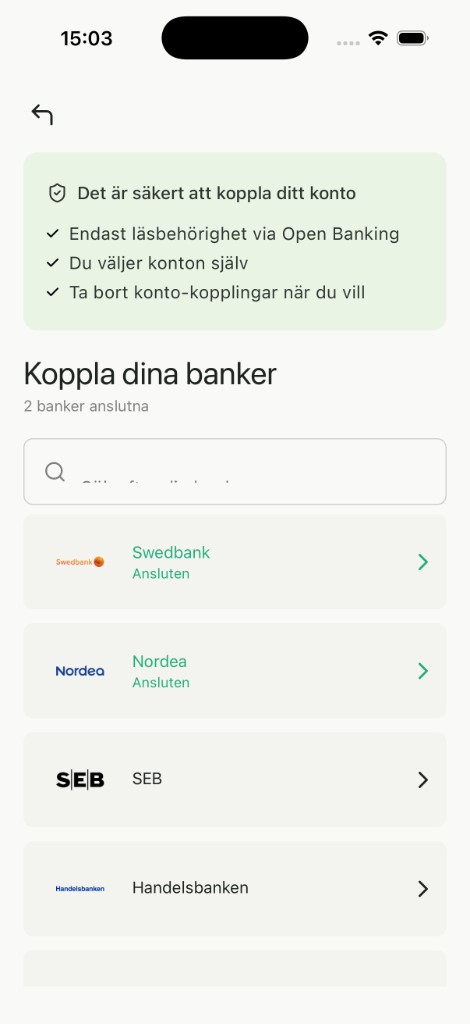
Steps 1-2: choose bank and start connection
You choose a bank in the list and continue to the bank secure approval flow.
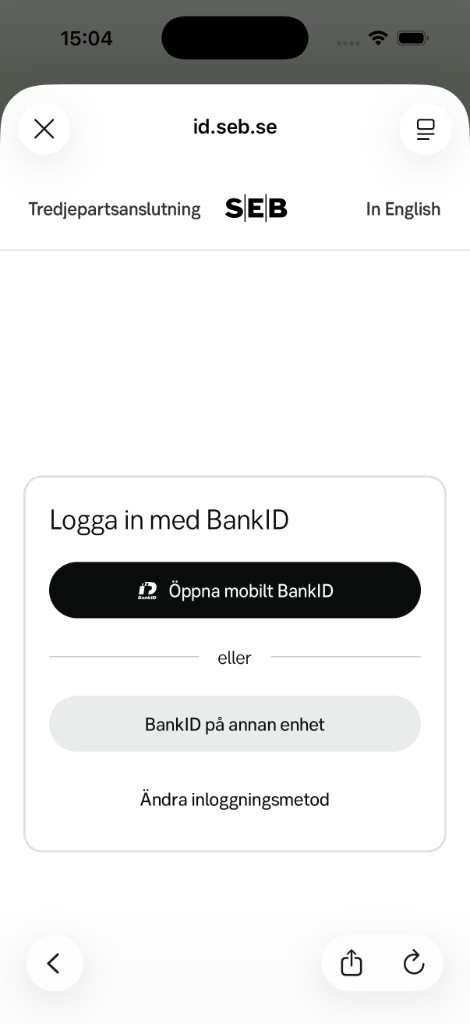
Steps 2-3: authentication and return
After BankID approval, you are sent back to the app to complete the connection.
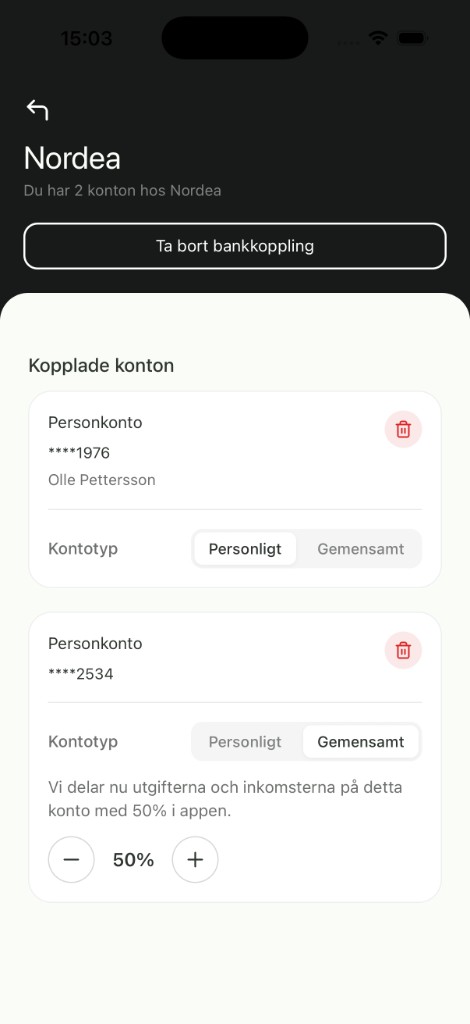
Step 4: account selection and activation
You choose which accounts to use—and for shared accounts you can specify what share of costs and income should count in your view. Perfect if you share an account with your partner.


What you get from the flow as a user
- you choose the bank and which accounts to activate yourself
- you get ongoing transaction sync instead of manual import
- you can renew, pause, or remove a connection at any time
- you get analysis and overview without giving the app payment rights
Open Banking via Enable Banking
Enable Banking handles the technical connection between Finton and your bank. When you choose a bank in the app and approve the connection in the bank flow, authentication and consent happen according to PSD2 with the bank you selected. Enable Banking forwards account data and transactions to Finton with the read-only access you granted.
More about how personal data is handled during bank connection is available in the terms.
What Finton can and cannot do
Finton can read account data and transactions to give you overview, categorization, and insights in the app.
Finton cannot make payments, move money, or change anything in your bank accounts. That boundary is central to the product design.
Common questions about Open Banking
What does Open Banking mean in Finton in practice?
In Finton, Open Banking means you can connect a bank, choose accounts, and get transactions into the app automatically. Finton uses read-only access for overview and analysis, not payments.
Who provides the Open Banking connection?
Finton uses Enable Banking as the technical Open Banking partner. Enable Banking connects the app to your bank via regulated APIs. When you connect an account, you also accept Enable Banking terms for bank connection.
How long does it take from bank connection until data appears?
It varies between banks and accounts, but the flow in the app guides you through connection, account selection, and sync. During sync you get clear status until transactions are in.
Can Finton make payments or move money?
No. Finton uses read-only bank account access. The app cannot initiate payments, move money, or change anything on your account.
What happens if the bank session expires?
You can renew the connection directly in the app. Finton guides you through a new approval so sync can continue without starting over from scratch.
Can I disconnect accounts or an entire bank connection?
Yes. You can disconnect individual accounts or remove an entire bank connection. You keep control and can choose to connect again at any time.
Try the Open Banking flow in Finton
Download the app and go through the steps yourself: choose a bank, activate accounts, and get real data into your finance view.